CloudTeams › Features › AI in CloudTeams

AI in CloudTeams

AI built into the work, not bolted on.

CloudTeams puts intelligence where the decisions are: one suggested task, a sourced read on every contact, and a chat that knows your whole business. You control the key, the model and the budget.

No per-seat enterprise pricing.

AI in CloudTeams

  • Built-in intelligence on every page
  • AI Task: one task for today
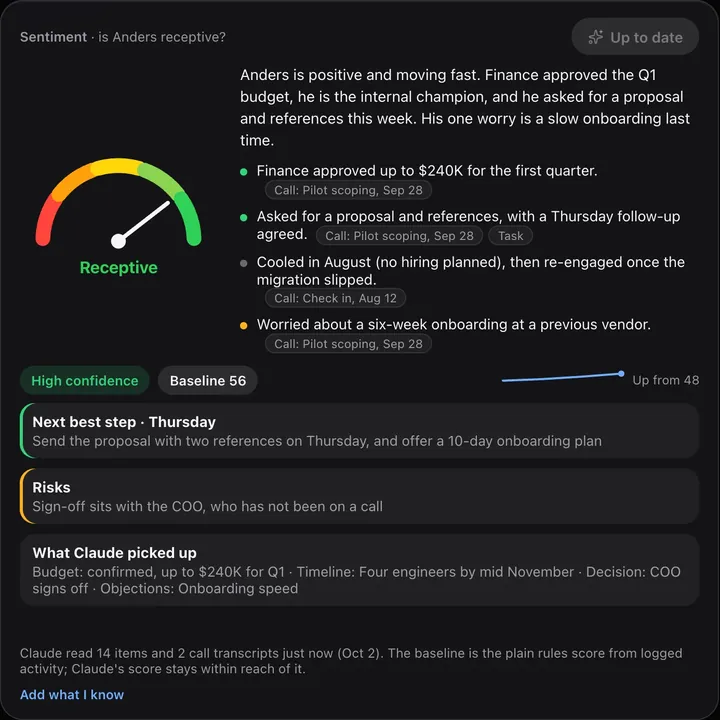
  • Analyze with Claude: a sourced read on a contact
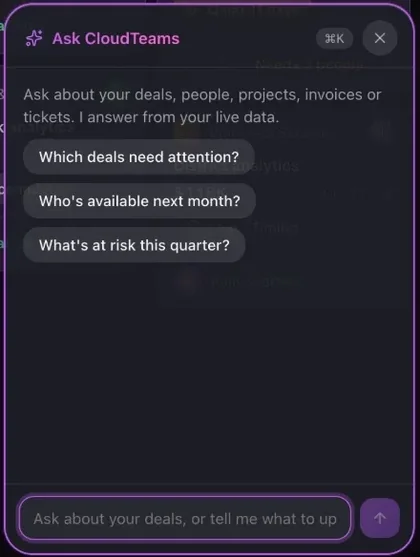
  • Ask CloudTeams: answers from your data

In short

CloudTeams has two layers of intelligence. Built-in intelligence is rule-based, runs inside CloudTeams, and appears on every page with a next step. On top of it, three optional AI features use Claude with your own Anthropic key: AI Task suggests one task worth doing today, Analyze with Claude scores how receptive a contact is with sources for every reason, and Ask CloudTeams answers questions from your live data. Admins set the model and a monthly spend cap.

Built inRule-based intelligence on every page, free and instant
Optional AIAI Task, Analyze with Claude, Ask CloudTeams
Your controlsYour key, your model, your monthly cap

Works with AI Task, Analyze with Claude, Ask CloudTeams. Last updated October 2, 2026.

The problem

What gets in the way today.

AI that cannot show its work

A score with no reasons is hard to trust.

AI that acts on its own

You want suggestions, not surprises in your data.

AI with no budget

Usage creeps up and nobody sees the bill.

What you get

A closer look at AI in CloudTeams.

Built-in

Intelligence on every page, free and instant.

Rule-based insights that end in an action, worked out inside CloudTeams.

  • Summaries and next steps on contacts, deals, tasks, talent, projects and invoices.
  • Three rule-based fit scores on every contact, each with its reasons.
  • A plain baseline sentiment score, before any AI is involved.

Rule-based

  • Insights with a next step
  • Fit scores with reasons
  • Baseline sentiment
  • Revenue health and forecast
AI Task

One task you would not think of.

Click once and CloudTeams looks across the business for the single best move today.

  • Reads deals, talent, projects, invoices, tickets and tasks.
  • Names a real person, deal or project, with a plain-English reason.
  • Nothing is saved until you click Add to my tasks.

AI Task

  • One task, not a list
  • A real record and a reason
  • You add it or dismiss it
Analyze with Claude

Know who is ready to buy, with receipts.

Claude reads everything recorded about a contact and scores how receptive they are.

  • Reads notes, tasks, follow-ups, the deal, the history and call transcripts you add.
  • A 0 to 100 score, a level, a confidence level, reasons, a next step and risks.
  • Every reason links to its source, and a reason with no source is dropped.
CloudTeams sentiment card with a Receptive score, summary, reasons with source links, a next best step and risks
Ask CloudTeams

A chat that knows your business.

Press ⌘K, ask a question, and get an answer from your live data.

  • Reads every area of the app, and knows which page you are on.
  • Drafts outreach, pitches and follow-ups.
  • Read-only: it cannot create, change or delete anything.
Ask CloudTeams chat panel with suggested questions
Your controls

You hold the key, the model and the budget.

AI in CloudTeams is optional and visible.

  • An admin connects the company's own Anthropic API key.
  • Pick the model that fits the job.
  • Set a monthly spend cap, and choose whether AI pauses when it is reached.
  • See usage, and compare it with what Anthropic bills.

Admin → AI usage

  • Your own Anthropic key
  • Model choice
  • Monthly spend cap
  • Pause at the cap
  • Usage compared with Anthropic's bill

How it works

Three steps, no fuss.

  1. 1

    An admin connects a key

    Add your Anthropic API key once in Admin, and pick a model.

  2. 2

    Set a cap

    Choose a monthly spend cap, and whether AI pauses at it.

  3. 3

    Use it where you work

    On Tasks, on a contact, or with ⌘K from any page.

FAQ

Questions, answered.

Which AI does CloudTeams use?

The optional AI features use Claude from Anthropic, with the company's own Anthropic API key. Admins can pick the model.

Is AI required?

No. The built-in intelligence is rule-based and works without a key. AI Task, Analyze with Claude and Ask CloudTeams are optional.

Can the AI change my data?

No. AI Task, Analyze with Claude and Ask CloudTeams only read. You decide what to save or change.

What gets sent to Anthropic?

Only when someone uses an AI feature: the records needed for that request, and any call transcripts you added to a contact, are sent to Anthropic's API.

Can I limit AI spend?

Yes. Admins set a monthly spend cap, can choose to pause AI when it is reached, and can compare usage with Anthropic's bill.

See it on your own data.

Request early access and try AI in CloudTeams with your own work.

No per-seat enterprise pricing.

You are on the list. We will be in touch shortly.

Request early access