CloudTeams › Features › AI agents and CumuloBot

Agents

Agents that do the legwork. You approve every step.

CloudTeams agents chase timesheets, follow up on quiet deals, shortlist people and watch for urgent email. Each one drafts, and a person approves.

No per-seat enterprise pricing.

Agents and CumuloBot

  • Chase: timesheet nudges
  • Pulse: stale-deal follow-ups
  • Scout: shortlists for open roles
  • Beacon: watches Gmail, read-only
  • Tempo: approved events to Google Calendar
  • Echo: an assistant with its own mailbox
  • CumuloBot on Telegram

In short

CloudTeams has six AI agents on the Agents page: Chase for timesheet nudges, Pulse for stale-deal follow-ups, Scout for shortlists for open roles, Beacon for watching Gmail read-only for critical email, Tempo for adding approved events to Google Calendar, and Echo, an assistant with its own mailbox that only drafts. Each drafts and a person approves. CumuloBot is the CloudTeams bot on Telegram: it answers read-only questions as the person asking, and nothing sends or writes without a button tap in a message the bot just sent to that person's own allow-listed chat.

Six agentsChase, Pulse, Scout, Beacon, Tempo and Echo
You approveEach agent drafts, and a person approves
CumuloBotTelegram, allow-listed accounts only

Works with AI in CloudTeams, Ask CloudTeams, Security and control. Last updated October 6, 2026.

The problem

What gets in the way today.

Follow-ups depend on memory

The quiet deal and the late timesheet are only chased when someone remembers.

Automation that acts on its own

You want help, not an email that went out without you.

Answers are one app away

You want to ask a quick question from your phone.

What you get

A closer look at AI agents and CumuloBot.

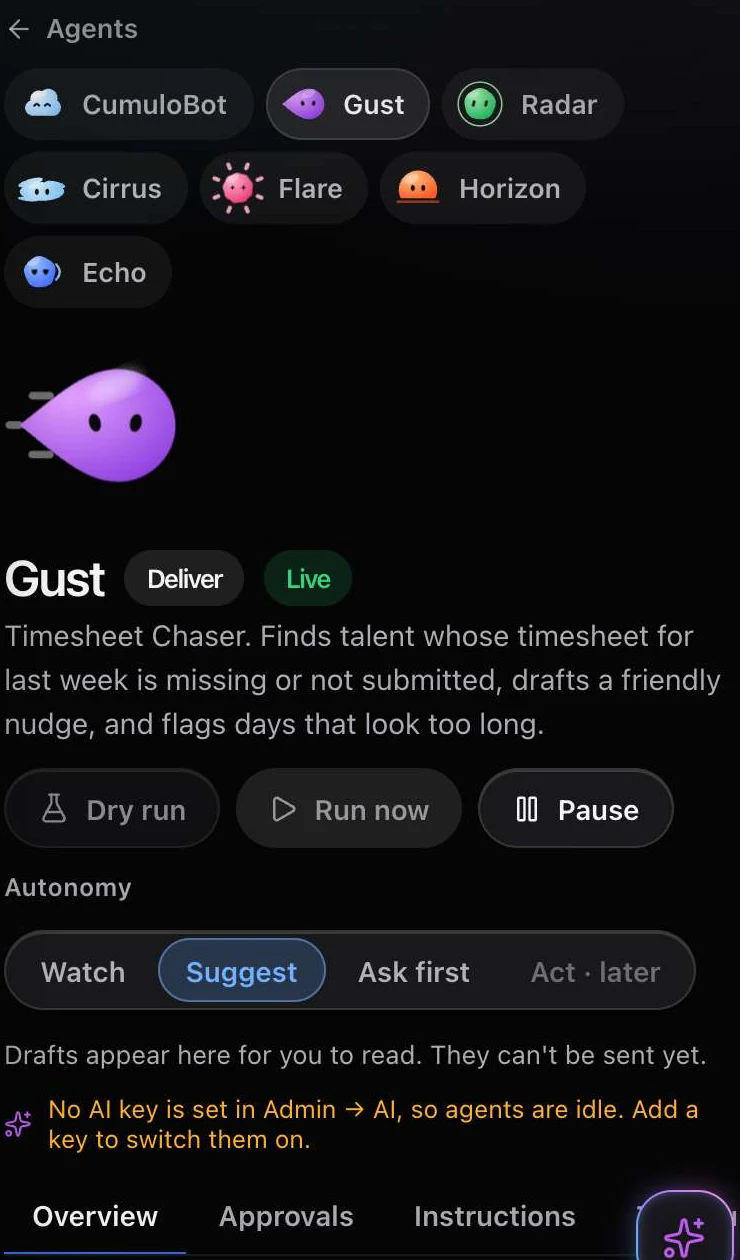
Agents

Six agents, each with one job.

Open the Agents page to see them, turn them on and review what they drafted.

  • Chase nudges people about timesheets.
  • Pulse follows up on stale deals.
  • Scout builds shortlists for open roles.
  • Beacon watches Gmail, read-only, for critical email.
  • Tempo adds approved events to Google Calendar.
  • Echo is an assistant with its own mailbox, and it only drafts.

The agents

  • Chase
  • Pulse
  • Scout
  • Beacon
  • Tempo
  • Echo
Control

They draft. You approve.

Agents are built to stay inside limits you set.

  • Each agent drafts, and a person approves.
  • Autonomy levels: Watch, Suggest and Ask first. An act-on-its-own level is deliberately not offered.
  • Undo windows, run caps and version history.
  • Scheduled runs are off by default.

Controls

  • Watch
  • Suggest
  • Ask first
  • Undo windows
  • Run caps
  • Version history
  • Scheduled runs off by default
CumuloBot

Ask your business from Telegram.

CumuloBot is the CloudTeams bot on Telegram, for allow-listed accounts only.

  • Answers read-only questions as the asking person's own role.
  • Opt-in alerts, and a morning brief from fixed templates with no AI.
  • /who for a dossier, /prep for a meeting brief, /staff for a shortlist, /reply for a Gmail draft, /book to hold a time, and /do for plans.
  • Nothing sends or writes without a button tap in a message the bot just sent to that person's own allow-listed chat.

CumuloBot commands

  • /who: a dossier
  • /prep: a meeting brief
  • /staff: a shortlist
  • /reply: a Gmail draft
  • /book: hold a time
  • /do: plans

How it works

Three steps, no fuss.

  1. 1

    Pick an agent

    Open the Agents page and choose what it may do: Watch, Suggest or Ask first.

  2. 2

    Let it draft

    It prepares the nudge, follow-up, shortlist or event. Scheduled runs are off until you turn them on.

  3. 3

    Approve

    A person reviews each draft and approves it, and the undo window is there if you change your mind.

FAQ

Questions, answered.

What are CloudTeams agents?

Six assistants on the Agents page: Chase, Pulse, Scout, Beacon, Tempo and Echo. Each does one job, drafts the result, and a person approves.

Can an agent act without me?

No. Autonomy levels are Watch, Suggest and Ask first. An act-on-its-own level is deliberately not offered, and scheduled runs are off by default.

Can I undo what an agent did?

Agents have undo windows, run caps and version history.

What is CumuloBot?

The CloudTeams bot on Telegram. It answers read-only questions as the asking person's own role, and sends opt-in alerts and a morning brief.

Can CumuloBot send email or change my data?

Not by itself. Nothing sends or writes without a button tap in a message the bot just sent to that person's own allow-listed chat. Only allow-listed Telegram accounts can use it.

Does the morning brief use AI?

No. The morning brief and the alerts use fixed templates.

See it on your own data.

Book a time and we will show you AI agents and CumuloBot on your own kind of work.

Request early access