CloudTeams › Features › Sell

Sell

Sell engagements without losing track of who you know.

Your network lives in LinkedIn and your head. CloudTeams puts leads, contacts, companies, deals and follow-ups in one place, with the context to make the next call count.

No per-seat enterprise pricing.

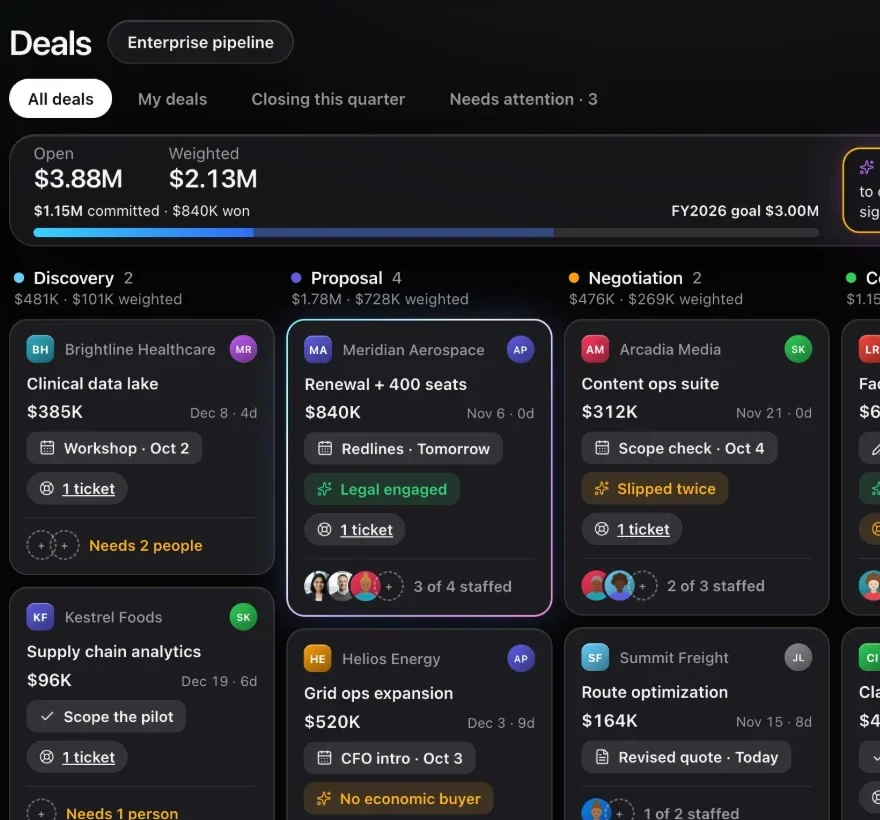
CloudTeams deals board with pipeline stages, a forecast and the people staffed on each deal
The deals board. Sample data.

In short

CloudTeams Sell is the CRM part of CloudTeams, built for small consulting and staffing firms. It holds leads, contacts and companies, runs deals on a drag-and-drop board with a forecast, quotes and billing models, and keeps every follow-up on one Tasks page. Deals show the team and open roles, so selling and staffing stay connected.

Leads and contactsRich records, fit scores, contact log, imports
DealsPipeline, forecast, quotes, billing models
TasksAssign, filter, follow up, one page

Works with Staff, AI in CloudTeams, Analyze with Claude. Last updated October 2, 2026.

The problem

What gets in the way today.

Your network is scattered

Names live in LinkedIn, notes live in your head, and nobody knows who introduced whom.

The forecast is a spreadsheet

You rebuild it every week, and it never shows who is available to do the work.

Follow-ups slip

A call you meant to make on Thursday is gone by Monday.

What you get

A closer look at Sell.

Leads and contacts

Remember who you know, and when to call.

Every contact carries the context that makes a follow-up worth making, and a Leads page tracks who you are working.

  • A Leads page for outreach: new, contacted, replied, meeting.
  • Company, role, LinkedIn, how you met, lifecycle and timezone.
  • Network links, follow-up dates and custom fields.
  • A contact log: record a call, email, meeting or note right on the contact.
  • Three fit scores with their reasons: for your firm, for CloudTeams, and for delivering work.

On every contact

CompanyRoleLinkedInHow you metLifecycleNetwork linksFollow-up dateTimezoneContact logFit scoresCustom fields
Import

Bring your network with you.

Start with the contacts you already have, and see what will happen before anything is saved.

  • Import from a CSV, a HubSpot or Apollo export, or LinkedIn's own export.
  • A dry run shows what will happen before anything is saved.
  • Background data from LinkedIn, Apollo or Clay: headline, seniority, past employers, company size and funding.
  • A contacts map, and convert a contact to talent in one step.

Getting started

  • CSV, HubSpot, Apollo and LinkedIn imports
  • Dry run before saving
  • Background and company profile cards
  • Contacts map
  • Convert a contact to talent
Deals

See the forecast, not a spreadsheet.

Pipelines with stages you edit. Drag a deal to move it, and the forecast follows.

  • Pipelines with editable stages, a drag-and-drop board and a forecast.
  • Other people on a deal, each with a role such as decision maker or champion.
  • Quotes with line items on the deal.
  • Say how a deal is billed: hourly, flat fee or monthly retainer. CloudTeams works out the numbers.
  • Deal team and open roles, so you can see what still needs staffing.
CloudTeams deals board with pipeline stages, a forecast and staffing on each deal
Tasks

Stop follow-ups slipping.

Every task has an owner and a date, and one page shows all of it.

  • Assign tasks to teammates.
  • Task types, filters, follow-ups and due dates.
  • One Tasks page for deal, contact and company work.
  • Built-in intelligence: plain-language summaries and next-step suggestions on contacts, deals and tasks.

The Tasks page

  • Assign to a teammate
  • Task types
  • Filters
  • Follow-ups and due dates
  • Deal, contact and company work together

How it works

Three steps, no fuss.

  1. 1

    Bring in your contacts

    Import a CSV, a HubSpot or Apollo export, or LinkedIn's export, or add people as you meet them.

  2. 2

    Run your deals

    Move deals across your pipeline, add quotes, set how each is billed, and build the deal team.

  3. 3

    Follow up on time

    Every follow-up becomes a task with an owner and a date.

FAQ

Questions, answered.

What is CloudTeams Sell?

It is the CRM part of CloudTeams: leads, contacts, companies, deals, quotes and tasks for small consulting and staffing firms.

Can I import from HubSpot or LinkedIn?

Yes. Import from a CSV, a HubSpot or Apollo export, or LinkedIn's own export. A dry run shows what will happen before anything is saved.

What are fit scores?

Every contact gets three rule-based scores, each with its reasons: fit for your firm, fit for CloudTeams, and fit to deliver work. They are worked out from the title, headline, company and your relationship.

How does a deal get billed?

A deal records how it is billed: hourly, flat fee or monthly retainer. CloudTeams works out the deal value and the project forecast from that.

How is it different from HubSpot?

CloudTeams connects selling to staffing and delivery. A deal shows its team and open roles, and the same record carries into projects, timesheets and invoices. There is no per-seat enterprise pricing.

Does it use AI?

The built-in intelligence is rule-based and runs inside CloudTeams. AI Task, Analyze with Claude and Ask CloudTeams are optional features that use your own Anthropic key.

See it on your own data.

Request early access and try Sell with your own work.

No per-seat enterprise pricing.

You are on the list. We will be in touch shortly.

Request early access