CloudTeams › Features › Deliver

Deliver

Run the work, then bill it from the same numbers.

Plan the project, track the hours, invoice the client and pay the contractor, without moving data between tools.

No per-seat enterprise pricing.

CloudTeams projects page with a Gantt timeline of phases and tasks and the people on each task
A project on the Gantt timeline. Sample data.

In short

CloudTeams Deliver covers the work after the deal closes. Projects run on a Gantt timeline or a kanban board with tasks and progress, and forecast revenue, cost and margin against a target. Contractors log hours with a weekly hours-cap policy, you approve them with their expenses, then invoice the client from approved hours and create contractor payouts, with the money totals reconciled.

ProjectsGantt, kanban, tasks, margin forecast
TimeWeekly hours cap, approvals, expenses
MoneyInvoices, payouts, financials, reconciled totals

Works with Contractor portal, Staff, Home and Dashboards. Last updated October 2, 2026.

The problem

What gets in the way today.

Plans live apart from hours

The project plan says one thing, the timesheets say another.

Friday timesheet chase

Hours arrive late, over the cap, or not at all.

Billing and pay are rebuilt by hand

Every invoice and payout starts from a new spreadsheet.

What you get

A closer look at Deliver.

Projects

Give every project one plan.

See the work on a Gantt timeline or a kanban board, with the people and the progress on each task.

  • Gantt timeline and kanban board.
  • Tasks with progress, and a project that starts from its deal.
  • Revenue, cost and margin forecast against a target margin.
  • Messages with your talent, in the same place.
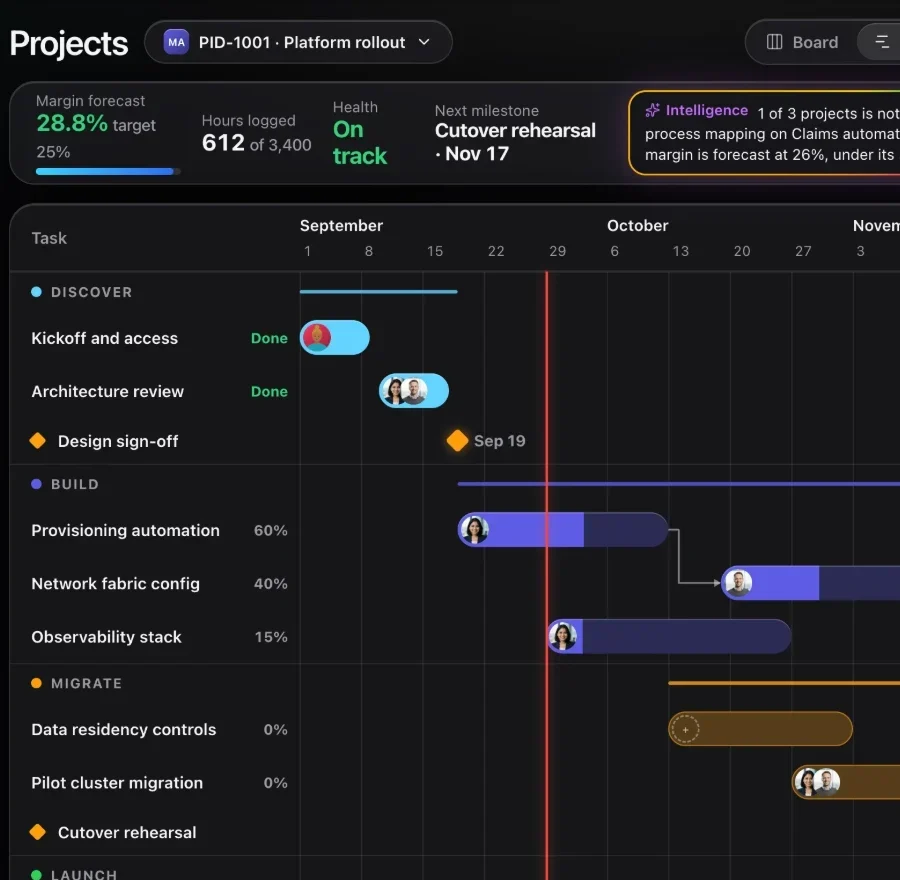
CloudTeams projects page with a Gantt timeline of phases and tasks
Time

End the Friday timesheet chase.

Contractors log hours in their own portal. You approve them and set the weekly cap.

  • Hours logged per day against a milestone.
  • A weekly hours-cap policy that can flag or block overruns.
  • Approvals: approve, or send back.
  • Expenses reviewed alongside hours.
CloudTeams timesheets for a week with hours, status, billable amount, cost and approve buttons
Money

Bill the client. Pay the contractor.

Invoice clients and create payouts from the same approved hours, with the money totals reconciled.

  • Approved hours wait under Ready to bill. Review, create a draft, send it, and mark it paid.
  • Each hour can only ever be billed once.
  • A payout is a frozen amount you owe one person. Send the money yourself, then mark it paid.
  • A Financials view of billing, cost and margin.
  • Payments are sent outside CloudTeams today. Payment processing is coming soon.
CloudTeams invoices with work ready to bill, and payouts showing what each person is owed

How it works

Three steps, no fuss.

  1. 1

    Plan the project

    Lay out tasks on a Gantt or kanban and put people on them.

  2. 2

    Track and approve time

    Contractors log hours and expenses, and you approve or send back.

  3. 3

    Invoice and pay

    Invoice the client and create the contractor payout from the same approved hours.

FAQ

Questions, answered.

What is CloudTeams Deliver?

It is the delivery side of CloudTeams: projects, timesheets, expenses, client invoices, contractor payouts and financials.

Can CloudTeams pay my contractors?

It creates the payouts and reconciles the totals. Payment processing is not built yet, so you send the money yourself and mark the payout paid.

What is the weekly hours cap?

A policy you set for how many hours someone can log in a week. You can choose to flag overruns or block them.

Can an hour be billed twice?

No. Each approved hour can only ever be billed once.

Does it connect to QuickBooks?

Not yet. QuickBooks sync is not built.

See it on your own data.

Request early access and try Deliver with your own work.

No per-seat enterprise pricing.

You are on the list. We will be in touch shortly.

Request early access