CloudTeams › Features › Ask CloudTeams

New · Ask CloudTeams

Ask your business a question. Get an answer from your own data.

Press ⌘K from any page. Ask which deals need attention, who is available next month, or what is at risk this quarter, and get an answer built from your live numbers.

No per-seat enterprise pricing.

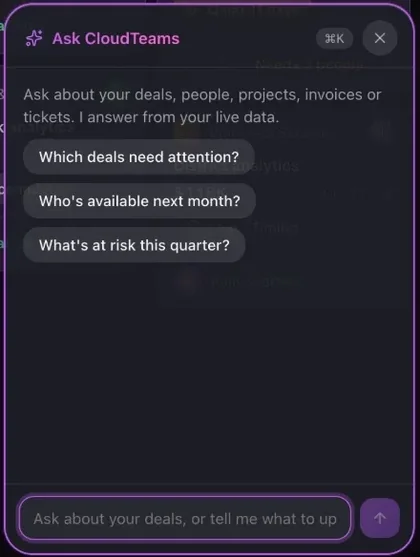
Ask CloudTeams chat panel: Ask about your deals, people, projects, invoices or tickets. I answer from your live data, with suggested questions
The Ask CloudTeams panel. Sample data.

In short

Ask CloudTeams is the chat built into every CloudTeams page, opened with Command-K. It reads your leads, contacts, companies, deals, talent, bench, open roles, projects, timesheets, expenses, invoices, payouts, financials, tickets, messages and tasks, plus the Knowledge base, and answers with links to the records. It can draft outreach emails, candidate pitches and client follow-ups. It is read-only: it cannot create, change or delete anything.

EverywhereOpens with ⌘K on any page and knows where you are
Your dataAnswers from live records, with links
Read-onlyDrafts text, never changes your data

Works with AI in CloudTeams, AI Task, Home and Dashboards. Last updated October 2, 2026.

The problem

What gets in the way today.

Answers are scattered

The pipeline is in one screen, the bench in another, and invoices in a third.

Reports take time

Someone has to build a view just to answer one question.

Follow-ups start from a blank page

You know who to write to, and you still have to write it.

What you get

A closer look at Ask CloudTeams.

Ask

One question, the whole business.

Ask in plain language from any page. Ask CloudTeams knows which page you are on.

  • Deals that need attention, and deals closing this quarter.
  • Who is available next month, and which roles are open.
  • Projects running late, invoices owed and tickets past their response time.
  • What is most at risk, and what to do first.

Try asking

  • Which deals need attention?
  • Who's available next month?
  • What's at risk this quarter?
  • Which invoices are overdue?
  • Which projects are running late?
Reads

It reads every part of CloudTeams.

Behind the chat are tools for each area of the app, so answers come from your own records.

  • Sell: leads, contacts, companies and deals.
  • Staff: talent, bench, staffing, the talent matrix and open roles.
  • Deliver: projects, timesheets, expenses, invoices, payouts and financials.
  • Support tickets, messages, tasks, the dashboard and the Knowledge base guides.

Areas it can read

  • Leads and contacts
  • Companies and deals
  • Talent, bench and matrix
  • Open roles
  • Projects and timesheets
  • Invoices, payouts and financials
  • Tickets and tasks
  • Knowledge base guides
Drafts

It drafts the follow-up. You send it.

Ask for the words, grounded in the records.

  • Outreach emails and openers to leads and contacts.
  • Candidate pitches for open roles.
  • Client follow-ups, summaries and plans.
  • Read-only: it can point you to the page where you make the change.

Writing help

  • Outreach emails
  • Candidate pitches
  • Client follow-ups
  • Summaries and plans

How it works

Three steps, no fuss.

  1. 1

    Press ⌘K

    From any page, or open the chat button.

  2. 2

    Ask in plain language

    Or pick one of the suggested questions.

  3. 3

    Check and act

    Follow the links to the records, or copy the draft.

FAQ

Questions, answered.

What is Ask CloudTeams?

A chat built into every CloudTeams page, opened with Command-K. It answers questions from your live data and links to the records.

Can Ask CloudTeams change my data?

No. It is read-only. It can draft text and point you to the page where you make a change.

Does it need an Anthropic key?

With your own Anthropic API key connected, it works as an assistant. Without one, it answers common questions from your numbers using built-in rules.

What does it read?

The areas of CloudTeams you can open: leads, contacts, companies, deals, talent, open roles, projects, timesheets, expenses, invoices, payouts, financials, tickets, messages, tasks and the Knowledge base.

What does it send to Anthropic?

When the assistant is on, the records needed to answer your question are sent to Anthropic's API.

See it on your own data.

Request early access and try Ask CloudTeams with your own work.

No per-seat enterprise pricing.

You are on the list. We will be in touch shortly.

Request early access