CloudTeams › Features › Meetings and booking pages

Meetings

Let people book a time, and let the booking do the paperwork.

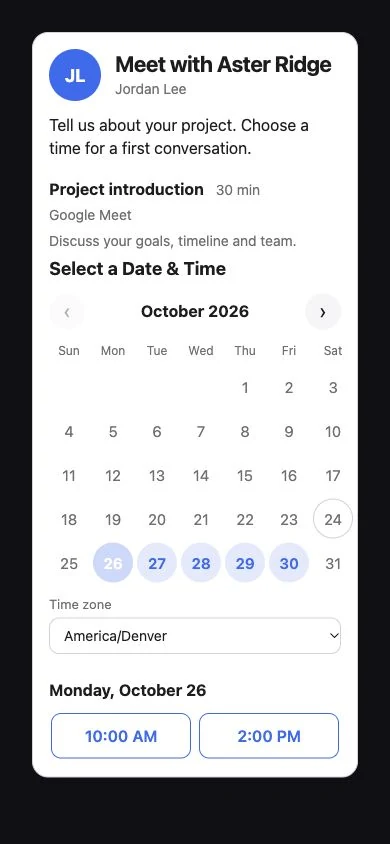
Share one link, or put a chat bubble on your website. Guests pick a time from your real Google Calendar, and CloudTeams creates the event, the lead and the follow-up trail.

No per-seat enterprise pricing.

Meetings and booking pages

  • Booking pages with several meeting types
  • Weekly hours, date overrides and buffers
  • Minimum notice and how far ahead to book
  • Google Calendar busy time respected
  • Google Meet link, or a pasted Zoom link
  • One confirmation email with a calendar file
  • Reschedule and Cancel links
  • A chat bubble for your website

In short

CloudTeams Meetings gives you booking pages at app.cloudteams.io/meet/ with a name you choose. A page can offer several meeting types, your weekly hours in your time zone, buffers, minimum notice and how far ahead people can book. Times are your hours minus busy time on your connected Google Calendar, and existing bookings. Each booking creates a Google Calendar event with a Google Meet link, makes a lead marked Meeting set, and emails the guest one confirmation with a calendar file and Reschedule and Cancel links.

Booking pagesSeveral meeting types, your hours, guests see their own time zone
Real availabilityYour hours minus Google Calendar busy time, no double-booking
Every bookingCalendar event, Meet link, lead and timeline notes

Works with Sell, Website forms, AI agents and CumuloBot. Last updated October 6, 2026.

The problem

What gets in the way today.

Scheduling is email ping-pong

Three messages to find one time, and the guest still guesses your time zone.

Bookings never reach the CRM

A call gets booked, and nobody makes the lead or writes it down.

Double-booking and dead hours

Your calendar says one thing and your booking tool says another.

What you get

A closer look at Meetings and booking pages.

Booking pages

One link, several kinds of meeting.

Set up a page once, then share the link or embed it.

  • Several meeting types on one page, such as a demo and a catch-up.
  • Weekly hours in the page's time zone, with date overrides.
  • Buffers around meetings, a minimum notice, and how far ahead people can book, up to 90 days.
  • Slots every 15, 30 or 60 minutes. Guests see times in their own time zone.
  • Share the link or embed the page in an iframe. Per-page accent color, photo and logo, in a dark frosted-glass look.

On each booking page

  • Several meeting types
  • Weekly hours and date overrides
  • Buffers and minimum notice
  • Book up to 90 days ahead
  • 15, 30 or 60 minute slots
  • Guest's own time zone
  • Iframe embed or link
Availability

Only times you are really free.

Availability comes from your calendar, not from a guess.

  • Your hours, minus busy time on your connected Google Calendar (primary), minus existing bookings and buffers.
  • If Google cannot be checked, no times are offered. It fails safe.
  • Double-booking is prevented.

How a time is offered

  • Your weekly hours
  • Minus Google Calendar busy time
  • Minus existing bookings
  • Minus buffers
  • No times if Google cannot be checked
After the booking

The booking does the paperwork.

Nobody has to copy a meeting into the CRM.

  • A Google Calendar event is created, with a Google Meet link, or a Zoom link you pasted into the meeting type.
  • A lead is made and marked Meeting set, with lines written to its timeline.
  • The guest gets one confirmation email from CloudTeams with a calendar file (.ics) and Reschedule and Cancel links.
  • Moves and cancels update the same calendar entry.
  • Google's own duplicate invitation is off by default. A per-page checkbox turns it on.

Each booking

  • Google Calendar event
  • Google Meet link or pasted Zoom link
  • Lead marked Meeting set
  • Timeline lines
  • One confirmation email with .ics
  • Reschedule and Cancel links
Emails

Your words, your logo.

An Emails tab on each booking page lets you edit what guests receive.

  • Edit the subject, heading, message and button label of four emails: guest confirmation, owner New booking, moved and cancelled.
  • Fill-in words such as {first_name}, {meeting}, {when}, {where} and {host}, with a live preview and Send me a test.
  • A per-page logo with a size slider, and a per-page accent color.

The four emails

  • Guest confirmation
  • Owner: New booking
  • Moved
  • Cancelled
Website chat bubble

A purple sparkle on your site that books the meeting.

Add one script line to any website.

  • A guided chat offers day and time buttons and books the meeting. It schedules and answers nothing else.
  • Typed times such as Thursday afternoon are read by a free built-in reader first, with a small capped AI fallback that can be turned off.
  • Title, subtitle and greeting are settable, and the site owner lists which websites may embed it.
  • When someone books through the bubble, the owner gets a Telegram alert from CumuloBot.

The bubble

  • One script line
  • Day and time buttons
  • Free built-in time reader
  • Optional capped AI fallback
  • Allowed websites list
  • Telegram alert on booking
Protection and reports

Keep spam out, and see what is booked.

Booking pages are public, so they are guarded.

  • A hidden field, a minimum fill time, optional Cloudflare Turnstile, and per-address and per-page rate limits.
  • A bookings-per-day chart for booked, moved and cancelled over 7, 30 or 90 days, and a ranking of your pages.

Protection

  • Hidden field
  • Minimum fill time
  • Optional Cloudflare Turnstile
  • Rate limits per address and per page
  • Bookings-per-day chart
Not yet

What it does not do yet.

Meetings is deliberately simple. These are not built.

  • No round-robin or group booking, and no several calendars or people on one page.
  • No recurring meetings.
  • No payments on bookings.
  • No automatically created Zoom meetings. Zoom is a link you paste into the meeting type.
  • No video providers other than Google Meet or a pasted Zoom link, and no reminders beyond Google's own.

Not built

  • Round-robin or group events
  • Recurring meetings
  • Payments on bookings
  • Several calendars or people per page
  • Automatic Zoom meetings
  • Reminders beyond Google's own

How it works

Three steps, no fuss.

  1. 1

    Create a booking page

    Name it, add your meeting types and weekly hours, and connect Google Calendar.

  2. 2

    Share it

    Send the link, embed the page, or add the chat bubble to your website.

  3. 3

    Meet

    The event, the lead and the timeline lines are created, and the guest gets one confirmation.

FAQ

Questions, answered.

What are CloudTeams booking pages?

Pages at app.cloudteams.io/meet/ with a name you choose, where guests book a meeting type from your real availability. A booking creates a Google Calendar event and a lead in CloudTeams.

Does it check my calendar?

Yes. Times offered are your weekly hours, minus busy time on your connected Google Calendar, minus existing bookings and buffers. If Google cannot be checked, no times are offered. Double-booking is prevented.

What happens when someone books?

A Google Calendar event is created with a Google Meet link, a lead marked Meeting set is made with lines on its timeline, and the guest gets one confirmation email with a calendar file and Reschedule and Cancel links.

Can I put it on my website?

Yes. Embed the booking page in an iframe, share the link, or add the chat bubble with one script line. The bubble books a time with day and time buttons and answers nothing else.

Does it work with Zoom?

You can paste a Zoom link into a meeting type. CloudTeams does not create Zoom meetings for you. Google Meet links are created automatically.

Can guests reschedule or cancel?

Yes. The confirmation email has Reschedule and Cancel links, and moves and cancels update the same calendar entry.

What does it not do yet?

No round-robin or group booking, no recurring meetings, no payments on bookings, no several calendars or people per page, no automatic Zoom meetings, and no reminders beyond Google's own.

See it on your own data.

Book a time and we will show you Meetings and booking pages on your own kind of work.

Request early access